Sioux Falls, SD · 24/7 US based support Talk to a person: (855) 374 2733
Phase 3 PAYMENTS
Point of sale

SumUp

Start with the checkout.
Then decide how much more you need.

SumUp can cover very different levels of checkout, from straightforward payment acceptance to a fuller point of sale setup with more operating and customer tools.

That matters because not every business needs the same hardware, software, loyalty, marketing, staff, or online functions.

We start with what needs to happen at checkout. Then we decide which SumUp setup actually belongs there.

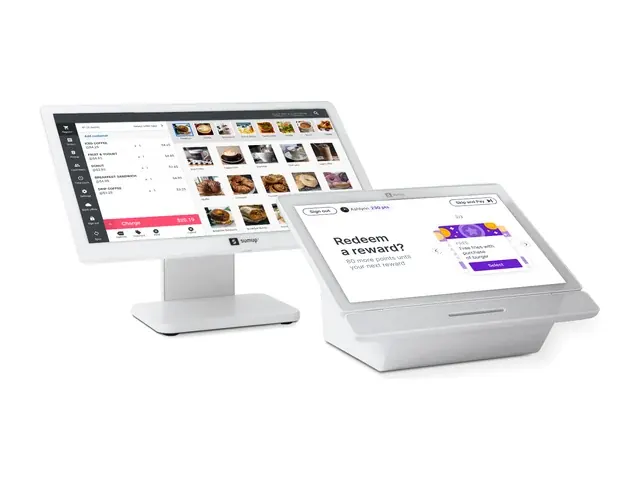
SumUp point of sale with customer display
What SumUp does well

SumUp earns its place
when the business needs
the right amount of POS.

SumUp becomes interesting because the business can start with a lighter checkout setup and move into a fuller point of sale configuration when it actually needs more.

The important question is not how many SumUp features exist. It is which level of SumUp covers the way the business sells, manages products, serves customers, and runs the operation.

Start with a lighter checkout

SumUp can support businesses that mainly need straightforward ordering, payment acceptance, product management, reporting, and day to day checkout without loading the operation with tools it does not need.

A lighter setup is valuable when lighter still does the job.

Move into a fuller POS when needed

The fuller SumUp POS can add more operating and customer tools when the business needs capabilities beyond straightforward checkout.

More functionality should follow a real business requirement, not simply the availability of a larger plan.

Inventory and reporting

Depending on the SumUp product and configuration, the business can manage products, track inventory, review sales activity, and use reporting to understand what is happening across the operation.

The exact inventory and reporting depth depends on the SumUp setup being used.

Customer rewards and marketing when relevant

Applicable fuller SumUp POS and customer engagement configurations can support customer rewards, customer information, and marketing communication.

Those tools matter when the business actually wants to manage customer relationships through the POS.

Online and staff tools when the setup calls for them

Applicable SumUp POS configurations can include online ordering, employee management, customer tools, and other operating features beyond the basic checkout.

Confirm which capabilities belong to the specific SumUp product before building the merchant setup around them.

SumUp is most interesting
when the business can start with what it needs
and leave out what it does not.

A merchant may only need straightforward checkout. Another may need a fuller POS with customer, staff, online, and operating tools.

The right SumUp setup is the one that solves today's workflow without buying tomorrow's complexity too early.

The SumUp setup

Start with the hardware
the business actually needs.

SumUp can range from straightforward payment hardware to a lighter register, a mobile all in one device, or a fuller counter POS.

The right setup depends on what has to happen at checkout, where employees work, how customers pay, and which SumUp software the business actually needs.

Phase 3 confirms the current product, hardware, and payment configuration before the merchant approves the setup.

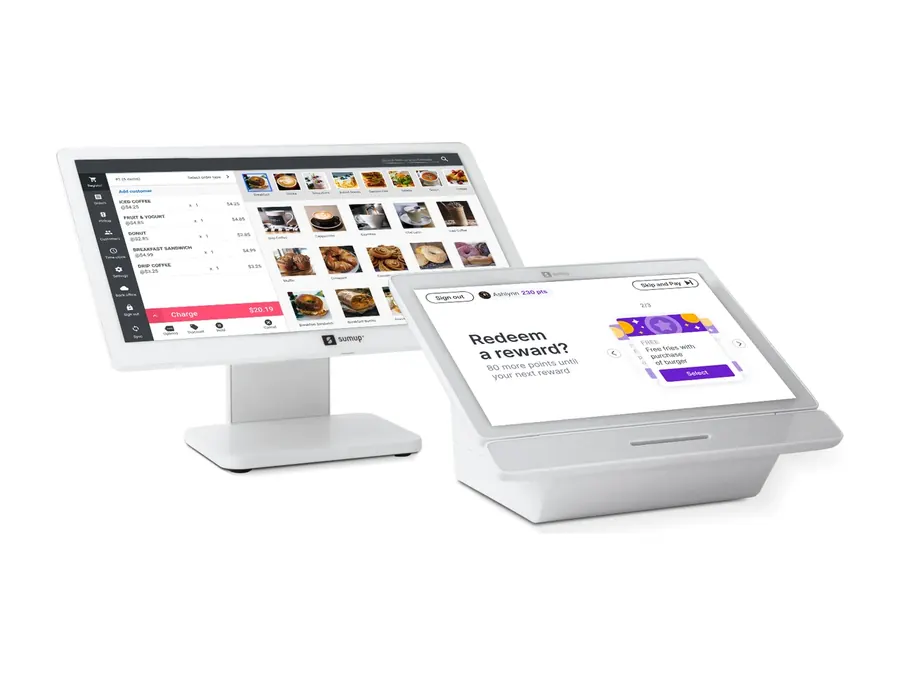
SumUp POS register and customer display

SumUp POS

The fuller counter setup

The fuller SumUp POS can combine the employee register, customer facing touchscreen, payment acceptance, and additional operating or customer tools in one counter setup.

Use the fuller POS when the business actually needs the broader SumUp software and customer experience.

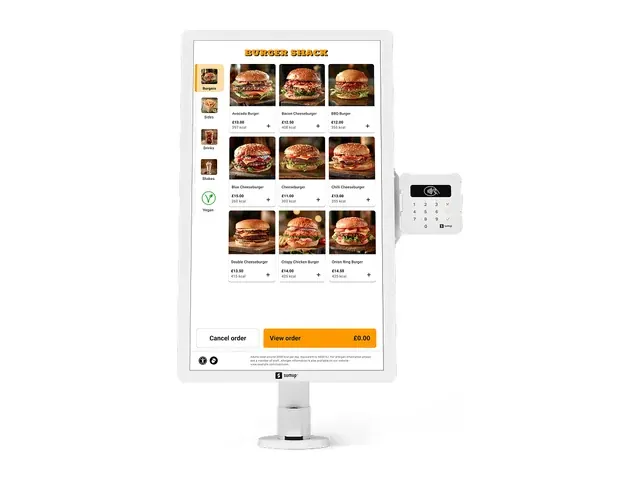
SumUp self service kiosk

Self service kiosk

Let the customer place the order

SumUp Kiosk can support customer ordering and payment within an applicable SumUp POS configuration.

Add a kiosk when self service solves a real ordering or queue problem, not simply because the hardware is available.

The goal is not more hardware.
The goal is enough hardware.

One merchant may need only payment acceptance. Another may need a lighter register. Another may need the fuller POS, a mobile device, or self service.

Start with the work that has to happen. Then choose the smallest SumUp setup that covers it well.

Build my SumUp setup →

Product photography supplied by SumUp.

Industries

Where SumUp
earns a serious look.

SumUp becomes worth comparing when the business wants straightforward checkout today and the option to use more POS, customer, staff, or online tools when the workflow actually calls for them.

The business type gives us context. The amount of POS the operation actually needs makes the decision.

Pricing is a separate conversation based on the merchant's real payment numbers and approved setup.

The industry gets us close.
The amount of POS picks the setup.

Two businesses in the same category can need completely different SumUp configurations.

Start with what has to happen at checkout and around the operation. Then choose the lightest SumUp setup that covers it well.

What it costs to run

Price the SumUp setup
you will actually use.

SumUp can range from straightforward payment acceptance to a lighter POS or a fuller point of sale configuration.

The complete cost depends on which SumUp product the business needs, which hardware belongs in the setup, which additional capabilities are required, and how payment processing is configured.

The merchant should see those pieces clearly before approving the setup.

SumUp product level

The first cost decision is which SumUp product actually fits the business. A business that mainly needs payment acceptance, a lighter POS, or the fuller SumUp POS can have very different software and hardware requirements.

Choose the product from the workflow before comparing the price.

Hardware

The register, customer display, card reader, mobile device, kiosk, printer, cash drawer, and other applicable hardware can change the total setup.

The merchant should understand which devices are included, who provides them, and what commercial terms apply.

Additional capabilities

Customer rewards, marketing tools, online ordering, employee tools, customer management, integrations, and other capabilities can depend on the SumUp product and configuration being used.

Do not pay for a larger SumUp setup simply because the extra functions exist.

Payment devices

The card reader or other payment device needs to match the SumUp product and merchant configuration being implemented.

The exact device and commercial terms depend on the approved merchant setup.

Payment processing

Processing cost depends on the merchant, approved processing relationship, payment mix, transaction volume, average card transaction, pricing structure, and SumUp configuration.

Compare the economics using the merchant's real payment numbers.

Quote the SumUp setup
the business will actually run.

A card reader, POS Lite setup, fuller SumUp POS configuration, customer tools, online functions, hardware, and processing can create very different merchant costs.

Put the product and capabilities that will actually go live on the quote.

SumUp pricing depends
on the product and setup.

SumUp products, hardware, additional capabilities, processing, and commercial terms can change over time. Phase 3 confirms the current merchant configuration and applicable costs before the setup is approved.

More SumUp is not
automatically better.

A fuller SumUp configuration can make sense when the business actually needs the additional customer, staff, online, and operating tools. If a lighter setup already covers the workflow, keep it lighter.

See my SumUp setup and cost →

Buying through Phase 3

SumUp gives you options.
Somebody still has to pick the right ones.

SumUp can range from straightforward payment acceptance to a lighter POS or a fuller point of sale setup with more operating and customer tools.

Phase 3 helps determine which version belongs in the business, how the hardware and payments fit around it, and what actually needs to be implemented.

Choose the right SumUp product

Phase 3 helps determine whether the business mainly needs payment acceptance, a lighter POS, or the fuller SumUp point of sale configuration.

The business should not pay for more SumUp simply because more SumUp exists.

Build the hardware plan

Phase 3 helps determine which register, customer display, card reader, mobile device, kiosk, printer, cash drawer, or other supported hardware belongs in the setup.

Use the hardware the workflow requires and leave out what it does not.

Build the payment setup around it

The SumUp product, payment device, processing relationship, and pricing structure need to work together.

Phase 3 reviews the merchant's actual payment requirements before recommending the setup.

Coordinate the implementation

Phase 3 coordinates the implementation work that applies to the approved SumUp setup so the merchant knows what needs to be configured, tested, and ready before launch.

The exact scope depends on the product, hardware, software, and systems involved.

Support after launch

Payment and equipment support is available 24/7 from a US based team.

If the issue involves SumUp software or another technology in the setup, Phase 3 can help identify the appropriate next step.

Phase 3 Digital if you need it

Phase 3 can also build and manage the public business website and provide ongoing search and advertising services through Phase 3 Digital.

Digital stands on its own. SumUp and payment processing are not required.

Website$99 a month with Phase 3 processing$199 a month as Standalone Digital

The value is not buying more SumUp.

The value is choosing the SumUp product, hardware, payment setup, and operating tools the business actually needs and leaving out what it does not.

If the business needs less, the setup should get smaller.

Build the right SumUp setup →

Before you decide

Ask the questions that matter
before you choose SumUp.

SumUp can mean very different things depending on the product and configuration.

A business may need straightforward payment acceptance, a lighter POS, or the fuller SumUp setup with more customer, staff, online, and operating tools.

The right question is not whether SumUp has more features. It is which features the business actually needs.

Is SumUp just for very small businesses?

No. SumUp offers different levels of payment and point of sale capability.

The better question is whether the SumUp product being considered covers the business's checkout, products, inventory, staff, customer, online, and operating requirements.

Business size alone should not pick the POS.

Do I need the fuller SumUp POS?

Not necessarily. A lighter SumUp setup may already cover the checkout, products, inventory, reporting, and payment workflow the business needs.

The fuller SumUp POS becomes more relevant when the merchant needs additional customer, employee, online, integration, or operating capabilities.

Do I actually need rewards and marketing?

Maybe, but they should not be the reason every merchant chooses SumUp. Applicable fuller SumUp configurations can include customer rewards, customer information, and marketing tools.

If the business does not plan to use those capabilities, do not build the buying decision around them.

Can I keep hardware I already own?

Possibly. Existing registers, card readers, printers, scanners, cash drawers, customer displays, and other equipment should be checked against the SumUp product and merchant configuration being implemented.

If the equipment is compatible, supported, and still fits the workflow, keeping it can be a good outcome.

What if the business needs more later?

Start with the setup that covers the business today and understand what would need to change if the requirements grow. That may mean adding capabilities, changing hardware, moving to another SumUp product, or comparing a different POS altogether.

Do not assume every future change is automatic.

The best SumUp setup
is the one the business will actually use.

A lighter setup can be the right answer. A fuller POS can be the right answer. SumUp can also be the wrong answer.

Choose from the workflow, not from the size of the feature list.

Ask us the SumUp questions →

Before you commit

SumUp should
earn its place.

SumUp offering different levels of payment and POS capability does not mean the business needs the biggest version.

Before changing anything, identify what the current setup already handles well, what the business actually needs next, and which SumUp product solves that problem without adding unnecessary complexity.

Keep what already works

If the current POS already handles checkout, products, inventory, staff, reporting, and the other workflows the business relies on, do not replace it merely because SumUp offers another option.

Changing less can be the better recommendation.

Do not buy more SumUp than you need

A lighter SumUp setup may already cover the checkout, products, inventory, reporting, and payment workflow the business needs. The fuller SumUp POS becomes relevant when the merchant genuinely needs additional customer, staff, online, integration, or operating capabilities.

More features are useful only when the business will actually use them.

Verify the requirements that cannot be lost

If the business depends on a specific booking, restaurant, inventory, gift card, online ordering, customer, employee, integration, or reporting workflow, confirm the exact SumUp product supports it before replacing the current system.

Prove the requirement before the merchant commits.

Do not buy a full POS for a payment problem

If the business mainly needs card acceptance, payment links, remote payments, invoices, recurring billing, or another straightforward payment workflow, replacing the POS may solve the wrong problem.

A simpler payment setup may be the better answer.

The goal is not to sell more SumUp.
The goal is to get the setup right.

Sometimes SumUp is the right answer. Sometimes another POS fits better. Sometimes the current system should stay and only the payment setup should change.

The recommendation should follow the problem, not the product being sold.

See if SumUp fits → Compare all POS systems →

The alternatives

If SumUp does not fit,
start with what the business needs next.

Do not move away from SumUp simply to choose a bigger or more familiar POS.

First identify what the business needs that the current SumUp setup does not provide. Then compare the systems or payment options that actually solve that problem.

If SumUp still covers the workflow well, keeping it is a perfectly good outcome.

Clover

Broader POS ecosystem

Worth comparing when the business wants a broader family of countertop, handheld, customer facing, kiosk, app, and operating options than the SumUp setup being considered.

Clover brings breadth. Make sure those additional options solve something the operation actually needs.

Explore Clover →

Square

Broader ecosystem from a simple start

Worth comparing when the business likes a simple starting point but needs a different mix of software, payments, online tools, devices, or operating functions than the SumUp configuration provides.

Compare the actual workflows rather than assuming two simple POS platforms solve the same problems.

Explore Square →

Quantic

Configurable restaurant and retail workflows

Worth comparing when the business needs a different combination of restaurant, retail, hardware, display, kiosk, payment, or operating workflows than the SumUp setup provides.

Define the requirement first, then confirm the Quantic configuration that would solve it.

Explore Quantic →

KORONA POS

Deeper inventory and operating control

Worth comparing when product management, inventory, replenishment, locations, employee permissions, ticketing, admissions, or other operating controls become more important than keeping the POS lightweight.

Define the operating requirement first, then verify whether KORONA actually solves it.

Explore KORONA POS →

Union

Hospitality specialization

Worth comparing when tabs, bar service, table service, mobile staff, permissions, payments, closeout, or another hospitality workflow needs more specialization than the SumUp setup provides.

Compare the actual service model rather than assuming every restaurant or bar needs the same POS.

Explore Union →

What if you do not need another POS?

If the real need is card acceptance, invoices, payment links, recurring billing, remote payments, or another straightforward payment workflow, replacing SumUp with another full POS may solve the wrong problem.

Compare the payment options before replacing the system that already runs the business.

See payment options → See terminals →

Do not leave SumUp
just to buy more POS.
Move when the business
needs a better fit.

Name the requirement SumUp is no longer meeting. Then compare the systems that actually solve that problem.

If SumUp still does the job well, keep it.

Compare all POS systems →

SumUp FAQ

Before you choose SumUp,
get these answers.

SumUp can mean anything from straightforward payment acceptance to a fuller point of sale setup with more customer, staff, online, and operating tools.

Before choosing it, understand which SumUp product the business actually needs and what comes with that configuration.

They are different levels of SumUp point of sale capability. POS Lite is designed around a lighter register setup with core ordering, product, inventory, reporting, and payment functions.

The fuller SumUp POS can add capabilities such as customer rewards, employee management, online ordering, customer tools, marketing, integrations, and broader hardware support depending on the current configuration.

Yes. SumUp offers card reader and payment focused options for businesses that do not need a larger POS setup.

The exact device should be selected from the payment workflow and the current Phase 3 SumUp offering.

No. Customer rewards, customer relationship tools, and marketing capabilities depend on the SumUp product and configuration being used.

A merchant should not choose a larger SumUp setup for those features unless the business actually plans to use them.

Applicable fuller SumUp POS configurations can support online ordering.

The menu, payment, fulfillment, customer, and operating workflow should be reviewed before online ordering becomes part of the merchant setup.

Applicable fuller SumUp POS configurations can include employee management, customer information, rewards, marketing, and other customer relationship tools.

Those capabilities are not identical across every SumUp product. Confirm the product before building the business workflow around the feature.

Yes. SumUp currently offers digital gift cards for eligible accounts, and applicable SumUp POS configurations may include additional gift card or voucher functionality.

The exact gift card requirements should be reviewed against the SumUp product and Phase 3 configuration being considered.

Depending on the product, a SumUp setup can involve card readers, lighter register hardware, the fuller SumUp POS, mobile devices, customer displays, printers, cash drawers, kiosks, and other supported equipment.

Phase 3 confirms which current products and devices belong in the merchant setup before anything is approved.

Possibly. Existing card readers, registers, printers, scanners, displays, cash drawers, and other equipment should be checked against the SumUp product and merchant configuration being implemented.

If the equipment is compatible, supported, and still fits the workflow, keeping it can be a good outcome.

Start with the SumUp setup that covers the business today and understand what would need to change if the requirements grow.

That may mean adding capabilities, changing hardware, moving to another SumUp product, or comparing a different POS altogether. Do not assume every future change is automatic.

The total depends on the SumUp product and merchant configuration being used. Applicable costs can include software, hardware, additional capabilities, payment devices, payment processing, and other services involved in the setup.

Phase 3 should show the applicable pieces clearly before the merchant approves the quote.

It depends on what is being implemented. A card reader or lighter POS setup is different from a fuller configuration involving products, inventory, employees, customer tools, online ordering, integrations, additional hardware, or other implementation work.

Phase 3 reviews the actual project and defines the implementation plan before anything changes.

Phase 3 payment and equipment support is available 24/7 from a US based team.

If the issue involves SumUp software or another technology in the setup, Phase 3 can help identify the appropriate next step and support path.

Yes. Phase 3 Digital can provide the managed Website service separately from SumUp.

Website pricing is $99 a month with Phase 3 processing or $199 a month as Standalone Digital.

Phase 3 Digital also offers ongoing search work and paid advertising management through the applicable Digital plans.

SumUp and payment processing are not required to use Phase 3 Digital.

Still not sure SumUp is the one?

See if SumUp fits → Compare all POS systems →

Tell us what isn't working.
We'll tell you what's worth changing.

Tell us what you are trying to fix or improve. We will tell you what should stay, what is worth changing and where Phase 3 can help.

Sometimes the honest answer is nothing.