A broad hardware lineup
Clover offers countertop, handheld, customer facing, and kiosk style options that can support different ways of taking orders and payments.
Clover gives businesses a broad point of sale platform with countertop systems, handheld devices, customer facing checkout, kiosks, business management tools, and an app ecosystem that can extend what the system does.
That range is exactly why the decision should start with the business. A restaurant, retailer, salon, professional service business, and simple checkout counter may all need very different parts of Clover.
We sell Clover when Clover fits. We will tell you when it does not.
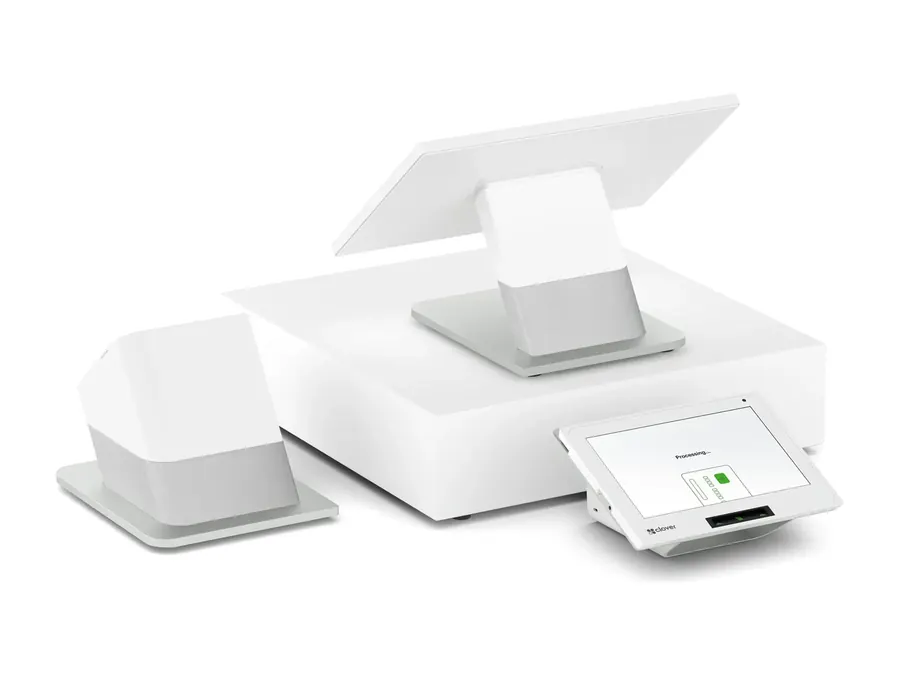
Clover can cover a lot of ground inside one point of sale platform. That makes it useful for businesses that need more than a basic payment terminal.
The key is choosing the parts the business actually needs rather than buying complexity just because it is available.
Clover offers countertop, handheld, customer facing, and kiosk style options that can support different ways of taking orders and payments.
Clover has an established app ecosystem that can extend the core point of sale with additional business tools.
App availability, pricing, compatibility, and functionality can vary by setup.
Depending on the Clover plan and configuration, the system can support items, inventory, employees, reporting, customer engagement, and other day to day operating functions.
A business can start with the Clover setup that fits today and evaluate additional devices, apps, and capabilities as the operation changes.
Adding more should solve a real problem, not simply make the system bigger.
If the business mainly needs simple card acceptance, Clover may be more system than necessary. If the business needs checkout, devices, operating tools, and room to extend the platform, that breadth can matter.
Clover is not one piece of hardware. It is a family of devices built for different places in the payment and point of sale workflow.
Start with where orders and payments actually happen, then choose the hardware that belongs there.
The right setup may use one device or several working together.
For the main checkout, service counter, register, or fixed point of sale station.
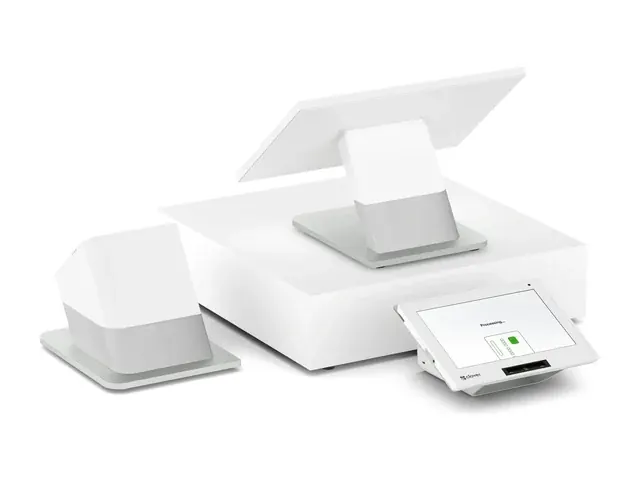
Two sides of the checkout
A full countertop point of sale with a large employee display and a separate customer facing screen for reviewing the transaction and completing payment.
A strong fit when the customer interaction at checkout matters.
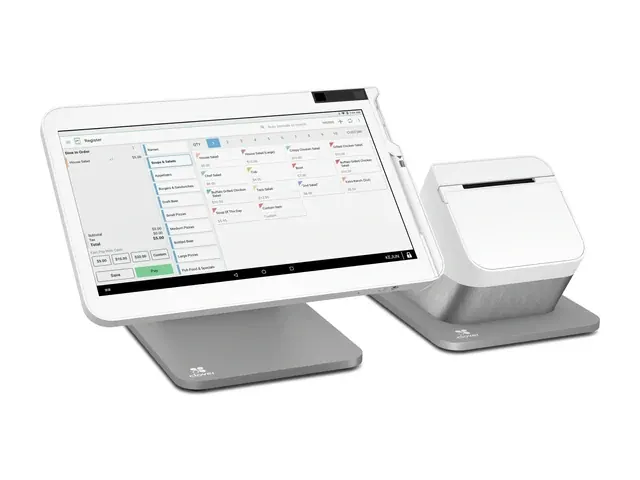
One main countertop screen
A full countertop point of sale built around one large employee display for taking orders, managing checkout, and running the Clover software used by the business.
Useful when the business needs a full register without a separate customer display as the centerpiece.
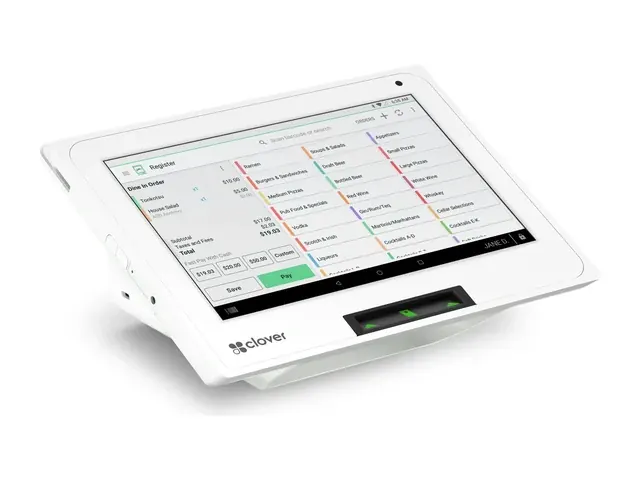
Full POS in less counter space
A compact Clover point of sale for businesses that need more than simple payment acceptance but do not want a larger Station setup taking over the counter.
Small footprint does not mean it is only a card reader.
For payments, orders, and service that need to move away from the main counter.
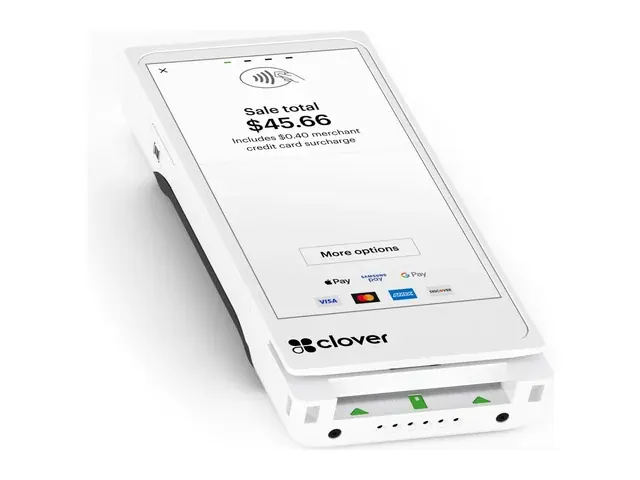
Full handheld POS
A handheld Clover device for taking orders and payments away from the main register.
Flex includes an integrated receipt printer and can work as part of a broader Clover setup.
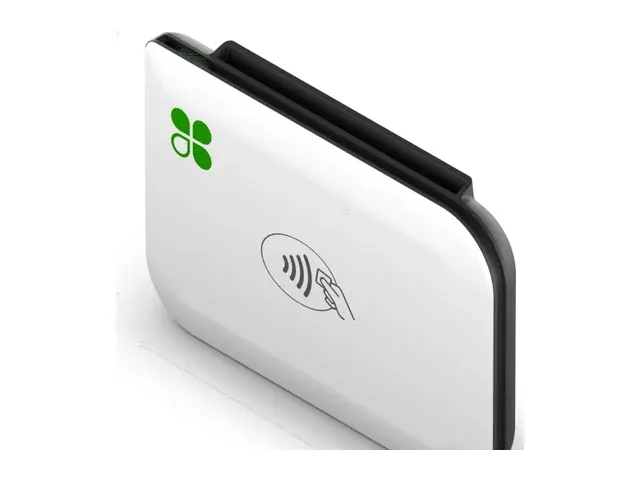
Card reader for a phone
A compact card reader used with the Clover Go app for businesses that need portable payment acceptance without carrying a larger point of sale device.
Useful for mobile sales, events, markets, and other simple payment workflows when the approved setup fits.
For businesses where the customer places the order or the kitchen needs its own operational screen.
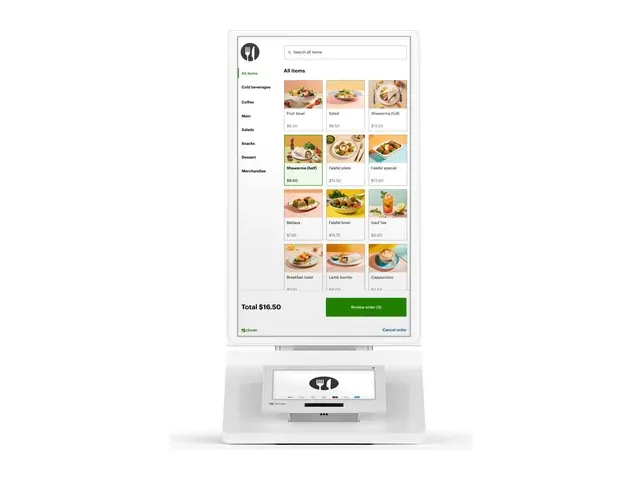
Customer self service
A Clover self service ordering system that lets customers place orders and complete payment without requiring the employee to enter every order at the main register.
It makes sense when self service solves an actual line, labor, or ordering workflow problem.
A busy restaurant may need countertop stations, handhelds, kiosks, and kitchen screens. Another business may need one Mini or a simple payment terminal. More devices are only better when they solve something.
Device availability. Available hardware, software plans, accessories, and pricing can change. Phase 3 confirms the exact Clover configuration before the merchant approves the setup.
Product photography supplied by Fiserv.
These industries often have workflows Clover can support, but the industry name does not choose the point of sale system.
We look at checkout, orders, inventory, staff, locations, customer flow, existing software, and how payments actually happen before recommending Clover.
Pricing is a separate decision based on the merchant's actual numbers.
Counter service, table service, handheld ordering, tips, customer checkout, and kitchen workflows can make Clover worth evaluating.
The exact fit depends on how orders move through the restaurant and what the current system already does well.
See the restaurant workflow →
Checkout, item setup, inventory, returns, employee access, and multiple locations can create a strong case for a broader point of sale platform.
The current store system should still be reviewed before replacing it.
See the retail workflow →
Service checkout, tips, retail products, memberships, recurring payments, and deposits can all be part of the payment workflow.
If the existing booking system works, first determine whether Clover needs to replace it at all.
See the salon workflow →
Clover can make sense when the business needs front desk checkout, in person payments, simple product sales, or another general payment workflow.
It is a point of sale system, not clinical software, medical records, or a patient management platform.
See the healthcare workflow →
Clover can fit when a firm has a real front desk or in person checkout need.
A business that mostly sends invoices or collects payments remotely may be better served by Phase 3 VT or another online payment workflow instead of a full point of sale system.
See the professional services workflow →
Counter checkout, parts deposits, payment at pickup, retail items, and customer facing payment can create a role for Clover in some shops.
The repair order or shop management system still matters. Do not replace software that already runs the operation well just to change payments.
See the automotive workflow →
Two businesses in the same industry can need completely different point of sale setups. We compare what happens inside the business before deciding whether Clover belongs there.
Not sure Clover is the one?
Compare all POS systems →
A Clover setup can have costs beyond the processing rate. Hardware, software, optional apps, accessories, and payment processing can all affect what the business actually spends.
We would rather compare the complete setup than make one number look unusually good by itself.
The devices the business needs are part of the total setup. The cost can depend on the Clover hardware selected, quantity, accessories, available promotions, and how the equipment is purchased.
Phase 3 should explain the hardware arrangement before the merchant approves it.
Clover software costs can depend on the selected device, software plan, business type, and capabilities the merchant needs.
Software is separate from the payment processing economics and should be shown clearly in the quote.
Additional apps and services may add functionality beyond the core Clover setup. Their pricing, availability, and billing can vary by provider and configuration.
Add them because the business needs them, not because the app exists.
Printers, cash drawers, scanners, stands, kitchen screens, handhelds, additional stations, and other hardware can change the total setup when the workflow requires them.
The quote should show what is actually being included.
Processing cost depends on how the merchant gets paid, transaction volume, card mix, average card transaction, pricing structure, and the approved processing relationship.
Compare the processing economics using the merchant's actual numbers rather than the business type alone.
Before the merchant approves the system, the quote should make the applicable hardware, software, optional services, additional devices, and payment processing structure understandable in one place.
If a cost applies to the setup, it should be clear what it is for.
Hardware, software plans, apps, accessories, promotions, and processing can change over time and by merchant configuration. Phase 3 confirms the actual setup and applicable costs before the merchant approves the quote.
The Clover hardware is only one part of the decision. The processor relationship, software plan, devices, configuration, implementation, support, and total cost all affect what the system is actually like to live with.
Our job is to look at the whole setup before the merchant commits to it.
We look at checkout, orders, inventory, staff, locations, customer flow, existing software, and how payments happen before deciding which Clover setup belongs in the business.
Sometimes that means Clover. Sometimes it means something else.
Hardware, software, optional apps, additional devices, accessories, and payment processing can all affect the total setup.
The quote should make the applicable pieces understandable before the merchant approves it.
Phase 3 coordinates the appropriate Clover and payment configuration around the merchant setup being implemented.
The exact work can vary by device, software plan, business type, apps, integrations, and existing systems.
Payment and equipment support is available from a US based team.
Some issues may also involve Clover, an app provider, an integration provider, the processor, or another technology involved in the setup.
Phase 3 can also handle the public business website, ongoing search work, and paid advertising management through Phase 3 Digital.
Digital stands on its own. Payment processing is not required.
Managed Website service is $99 a month with Phase 3 processing or $199 a month as Standalone Digital.
The value is figuring out what the business actually needs, putting the applicable setup and costs in front of you clearly, and supporting what gets implemented.
If Clover is more system than the business needs, we should say so before you buy it.
Clover has a lot going for it. It also has decisions around processing, software, apps, hardware, and switching that are easier to understand before the system is installed.
These are the questions we would want answered before putting Clover into our own business.
Maybe. Do not assume the answer is automatically yes or automatically no.
The options can depend on the Clover device, merchant account, original processing setup, how the equipment was provisioned, and the processing relationship involved.
If future switching flexibility matters to you, ask how the specific hardware and processing setup works before approving the system.
Do not evaluate Clover from one processing rate or one hardware price.
The applicable setup can include hardware, software, optional apps, additional devices, accessories, and payment processing.
Ask to see the complete setup and the costs that apply to your business before comparing quotes.
Find out what was actually causing the problem before assuming every Clover system will behave the same way.
Performance can involve the device, network connection, software configuration, installed apps, integrations, or another part of the setup.
We would rather diagnose the problem first than sell replacement hardware without understanding what happened.
Only the ones that solve a real business problem.
Clover has an established app ecosystem, but additional apps can bring their own functionality, subscriptions, setup requirements, and support relationships.
Start with the core workflow. Add apps when the business can explain exactly what they are supposed to improve.
Phase 3 payment and equipment support is available from a US based team.
Depending on the issue, the solution may also involve Clover, an app provider, an integration provider, the processor, or another technology used in the merchant setup.
The important thing is knowing where to start instead of figuring out the support path after something breaks.
Understand the hardware, software, processing relationship, apps, support path, and total cost before approving the setup. A good Clover decision should still look good after the system has been running for a while.
We sell Clover. That does not mean every merchant needs Clover.
Before replacing anything, we want to know what the current system already does well, what the business actually needs next, and whether Clover solves those problems better than the alternatives.
If the current point of sale already handles the business well and the real problem is processing, support, equipment, or another part of the payment setup, replacing the entire system may create more work than value.
Changing less can be the better recommendation.
Some businesses depend on specialized operating software, industry workflows, or integrations that matter more than having Clover specifically.
If Clover cannot support a requirement the business considers essential, another system may be the better fit.
Some businesses mainly need to accept cards, send invoices, take remote payments, run recurring billing, or use a straightforward payment device.
If the business does not need the broader point of sale functions, Clover may be more system than necessary.
Phase 3 VT, online payments, or a simple payment terminal can be enough when those fit.
Sometimes Clover is clearly the better setup. Sometimes another point of sale system fits better. Sometimes the business should keep what it has and change only the payment piece.
Clover is one option in the Phase 3 point of sale lineup. If it misses something the business actually needs, compare the systems around that requirement instead of forcing Clover to work.
Sometimes the better answer is another POS. Sometimes it is keeping the current system. Sometimes it is not buying a full POS at all.
Full POS system
A full point of sale system with payments, hardware, online tools and business software in one account.
Explore Square →
Restaurant and retail workflows
Worth comparing when Quantic supports the ordering, checkout, inventory, device, or operating workflow the business needs.
Confirm the exact software, hardware, integrations, and processing configuration for the merchant before recommending it.
Explore Quantic →
Inventory and multiple locations
Worth comparing when inventory control, multiple locations, detailed product management, or another retail operating requirement is central to the decision.
The exact merchant workflow and required integrations still determine whether KORONA POS fits.
Explore KORONA POS →
Bar and hospitality workflows
Worth comparing when the business depends heavily on bar service, tabs, speed at checkout, or hospitality workflows that need to be evaluated against what Clover would provide.
The actual venue, payment flow, and operating requirements should determine whether Union belongs in the comparison.
Explore Union →
Full POS system
A full point of sale system with payments, inventory and customer tools in one setup.
Explore SumUp →
If the business mainly needs in person card acceptance, a simple payment device may be a better fit than replacing or adding a complete point of sale system.
Tell us what the business has to do, what the current system already handles, and what is not working. Then compare Clover, another POS, or a simpler payment setup against that list.
Clover is a trademark of Fiserv, Inc. Square is a trademark of Block, Inc. Quantic, KORONA POS, Union and SumUp are trademarks of their respective owners. Product photography is supplied by the respective manufacturer and remains their property. Phase 3 Payments is an authorised reseller. Product names are used descriptively and do not imply endorsement.
The device is only one part of the decision. Processing, software, apps, existing systems, implementation, and the way the business actually operates all matter too.
Maybe. Do not assume the hardware can always move to another processing relationship, and do not assume it automatically has to be replaced either.
The answer can depend on the Clover device, merchant account, original processing setup, how the equipment was provisioned, and the processing relationship involved.
If future switching flexibility matters, ask how the specific Clover and processing setup works before approving it.
Start with where the work happens.
A fixed checkout may call for Station Duo, Station Solo, Mini, Compact, or another approved countertop setup. Mobile ordering or payment may call for Flex, Flex Pocket, or another handheld option. Self service and kitchen workflows may use Kiosk or Kitchen Display System when appropriate.
The right device depends on the actual business workflow and current Clover availability through Phase 3.
Dual pricing may be available depending on the approved processing relationship, Clover configuration, merchant setup, applicable card brand requirements, and other program requirements.
We review the merchant's actual processing numbers and customer experience before recommending a pricing program.
Do not choose dual pricing simply because the business uses Clover.
It depends on the business and the system being replaced.
Phase 3 reviews the current setup and coordinates the implementation work that applies to the approved Clover configuration. Some information may be recreated, imported, configured, or handled another way depending on the systems involved.
We should define what is moving and who is responsible for it before launch.
No. Start with the functions the business actually needs.
Clover has an established app ecosystem, but additional apps can have their own functionality, pricing, setup requirements, and support relationships.
Add an app when it solves a real business problem rather than because it is available.
The total depends on the actual setup.
Applicable costs can include hardware, software, optional apps or services, additional devices, accessories, and payment processing.
Phase 3 should show the applicable pieces clearly before the merchant approves the quote.
Possibly. Existing software should be reviewed before replacing it.
If the current system handles an important business workflow well, determine whether Clover can work alongside it, whether a verified integration exists, or whether replacing the current system creates more problems than it solves.
Do not replace good software just to change the payment setup.
Phase 3 payment and equipment support is available from a US based team.
Depending on the issue, the next step may also involve Clover, an app provider, an integration provider, the processor, or another technology involved in the merchant setup.
Call Phase 3 first and tell us what is happening.
Clover devices use network connectivity for normal point of sale and payment operations.
The exact connectivity options and behavior can depend on the Clover device, configuration, and services being used.
Before installation, confirm the business has the network environment required for the approved setup.
It depends on what is being implemented.
A simple payment setup is different from a restaurant with multiple stations, handhelds, menus, apps, kitchen screens, integrations, or other configuration work.
Phase 3 should review the actual setup and give the merchant a realistic implementation plan before anything changes.
Yes. Phase 3 Digital can provide the managed Website service separately from Clover.
Website pricing is $99 a month with Phase 3 processing or $199 a month as Standalone Digital.
Phase 3 Digital also offers ongoing search work and paid advertising management through the applicable Digital plans.
Payment processing is not required to use Phase 3 Digital.
Then we should not sell you Clover.
If the current point of sale already works, keep it when practical. If the business mainly needs card acceptance, invoices, recurring billing, remote payments, or another simpler payment workflow, a different Phase 3 payment setup may make more sense.
The goal is to get the system right, not make every merchant a Clover merchant.
Tell us what you are trying to fix or improve. We will tell you what should stay, what is worth changing and where Phase 3 can help.
Sometimes the honest answer is nothing.